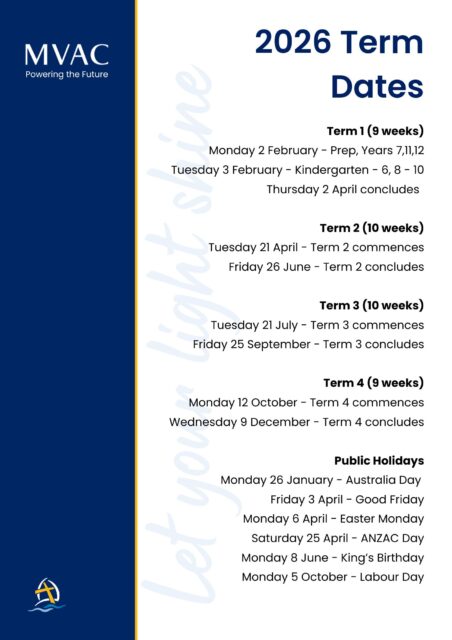
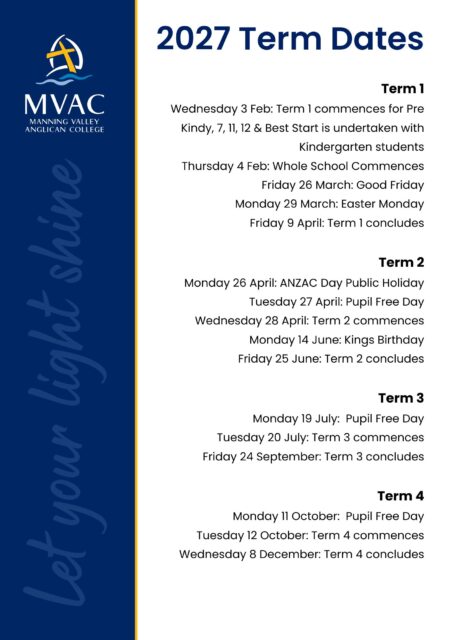
Term Dates and Information

How we communicate
We like to make things easy when communicating with us and managing your child’s educational journey.
When you become a MVAC parent, you will receive a MVAC Login, which is your key to accessing all our online services.
This is how you access all modes of communication from us in one place.
- eMpower – Our Portal and Learning Management System
- Parent Lounge – Helping you manage your family’s enrolment including Academic Reports, Bookings, Attendance and more
- The MVAC App – Bringing everything together in one place through open and regular communication.
We are endeavouring to make our communication process much easier and encourage everyone to engage with eMpower as our main mode of delivery. You can expect the weekly update, news articles and important information regarding your child’s education to be found on eMpower.
The MVAC App
The College App provides an easy access point to eMpower and allows for instant notifications as you need them.
Step 1 – Activate your MVAC Login
Step 2 – Download the MVAC App (apple, android)
Step 3 – Login to eMpower
Step 4 – Manage all activity through the MVAC App which provides access to all platforms in one location:
- eMpower
- School notifications
- Paying tuition fees
- Absentee submissions
- Permission notes and payments
- Parent lounge
- Canteen ordering
- News items
- School calendar
It means you can stay in contact with MVAC and manage your parent portal from your phone or device of choice.
As part of the Newcastle Anglican Diocese, MVAC has access to a large IT support department that students, parents and staff can access when needing assistance with any of our digital platforms.
Once you have made the decision to enrol at MVAC you become a part of our community.
We have an active Facebook page which you can follow for updates. We encourage our grandparents, family friends and relatives to follow our page as it is a great way for them to stay connected and celebrate student achievement.
Further information regarding your child’s enrolment is received within a parent information handbook. Please refer to the application process for the next steps.
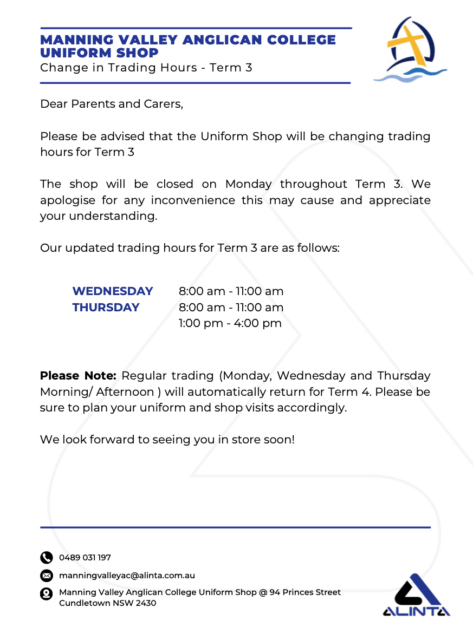
Alinta College Uniform
The College uniform is available through the Alinta school uniform shop which is located on grounds.
They are open the following hours.
Monday 8am – 10am
Wednesday 8am – 10am
Thursday morning 8am – 10am
Thursday afternoon 1pm – 4pm
Phone 0489031197